


Perfect365: Face Makeup Editor
3.547.80K Reviews
App Specs
- Version
- 10.31.18
- Updated On
- License
- Free
- Downloads
- 50,000,000+
- Developer
- Perfect365, Inc.
- Categories
- Beauty
- Platform
- Android, iOS
Screenshots
 Analysis by AppCompare
I usually start with a photo that feels almost right: the lighting works, the expression is natural, but I’m curious how it might look with a different makeup choice. That is where Perfect365 Makeup Photo Editor makes sense to me. It turns a beauty edit into a small experiment rather than a commitment, letting me compare looks before I decide whether a particular color or style suits the picture. It is a free beauty app from Perfect365, Inc., rated for Everyone, and its appeal is easy to understand: I can try a change on a phone instead of redoing a photograph or reaching for makeup just to test an idea.
Begin with the photo you actually want to use
The best starting point is a clear image where the face is visible and the lighting is reasonably even. That gives the app’s face detection a better chance of placing makeup naturally. I would not treat that as a strict requirement, but it is a useful practical choice: a shadow across the eyes or a face turned sharply away from the camera can make any digital application look less convincing. Before choosing a look, I also decide what I want the edit to do. A subtle polish for a profile photo is a different task from testing a bold lip color for fun.
That small bit of intention saves time. Rather than applying every effect and then trying to undo a jumble of changes, I can start with one feature I want to explore and judge it in context. If I am checking lipstick, I keep the rest of the look restrained. If I want to see whether a dramatic eye suits the photo, I avoid piling on other strong changes at the same time. This makes comparisons clearer and helps me spot when an effect is doing more than I intended.
A practical editing flow, from look to save
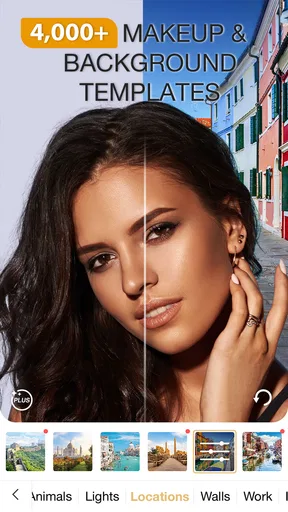
First things first, the interface of Perfect365 Makeup Photo Editor is super user-friendly. When you open the app, you’re greeted with a clean layout that’s easy to navigate. It’s perfect for those like me who might not be the most tech-savvy. The app offers a wide range of makeup styles, from subtle enhancements to bold and dramatic looks. You can literally transform your photos with just a few taps.
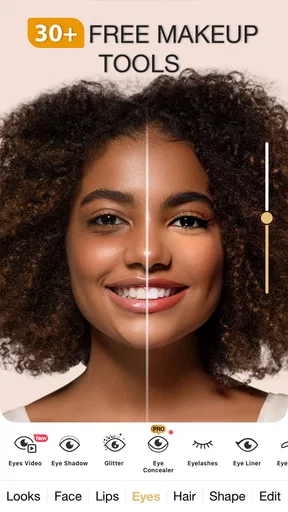
The app is packed with fun and functional features. One of my favorites is the real-time makeup application. This means you can see the makeup applied as you take a selfie. Talk about instant gratification! There’s also an extensive palette of colors, allowing you to customize everything from lipstick shades to eyeshadow tones. And if you’re feeling adventurous, you can even change your hair color. It's like having a mini makeover session whenever you want.
For a quick everyday example, imagine I have a selfie I might use for a social profile but do not want to retake. I can compare a soft look with a stronger lip, then adjust the intensity until the edit fits the photo instead of overpowering it. I would zoom out and look at the whole image before settling on anything: a shade that looks appealing close up can dominate the face at thumbnail size. If the aim is simply to preview a makeup idea, I can stop there; if I like the result, I can save or share the finished image.
How the app handles the handoff
Another cool feature is the face detection technology, which is surprisingly accurate. It identifies the key points on your face to ensure that the makeup is applied seamlessly. This means no more awkwardly placed eyeliner or mismatched foundation. The app does a pretty good job of keeping things realistic while still letting you experiment with different looks.
Worth Reading Before You Choose

Flipboard Shows What News Apps Must Do Beyond the Feed

Switching to Android Auto Means Rethinking Your Driving Routine

Google Calendar Makes a Crowded Week Easier to Manage

Ludo King Makes the Most of the Minutes Between Plans

Baby Panda World Brings Quick Play to Modern Phones, but Its Game Library Feels Busy

ESPN’s Live Game View Makes Following Close Games Easier
That placement is helpful, but I still treat the preview as a guide rather than a promise of how makeup will look in person. Digital color depends on the photo, and a screen preview cannot reproduce the feel, finish, or wear of a real product. I would use the app to narrow down a direction—perhaps warm rather than cool tones—not to assume that a particular shade will match a product I later buy. This distinction matters most when I am using an edit to make a real shopping decision.
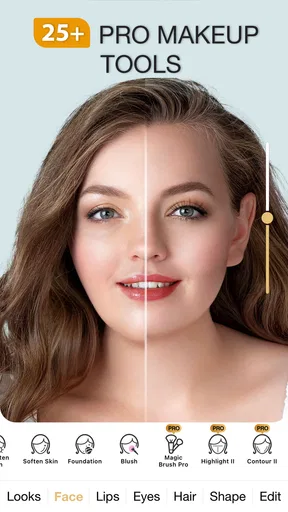
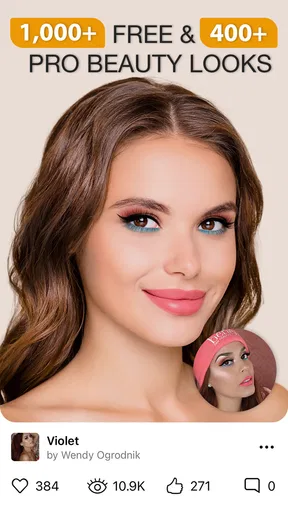
One thing I appreciate about Perfect365 is the level of customization it offers. Whether you want to go full glam or keep it natural, there’s a look for every occasion. You can adjust the intensity of each makeup element, which means you can dial down the blush or amp up the mascara as you see fit. Plus, the app regularly updates with new looks and trends, so you’re always in the loop with the latest in beauty.
My useful little workflow is to pick a starting look, change only one or two elements, and then compare the result with the original image. That makes the controls more valuable than simply choosing a preset: a preset can be a starting point, while intensity adjustments help it feel less like a filter pasted over the face. I also keep the original photo in mind throughout. If the edit changes the overall mood or makes the face feel unlike me, I ease back rather than trying to make every available effect fit.
Where it fits among beauty apps
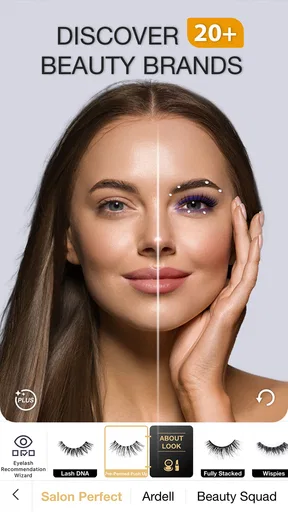
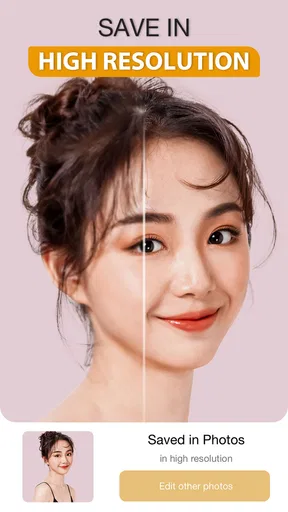
For those who love sharing their looks, the app makes it easy to save and share your creations on social media. It’s a great way to show off your makeup skills and inspire others. Plus, the app has a community feature where you can explore looks created by other users and even try them on yourself.
That community angle makes the app feel different from a basic photo editor focused on cropping, exposure, and general color correction. Those tools are better when the main problem is a dim image or an awkward frame; Perfect365 is the more relevant choice when I specifically want to test makeup, facial beauty effects, or hair color. Compared with applying makeup manually in a general editor, its beauty-focused controls are more direct. The trade-off is that a broad photo editor is usually the better place to finish a picture when I want detailed control over the whole scene rather than a face-centered makeover.
Sharing is useful when I want a second opinion, but I would not make it the only way I judge a look. A community can be a source of ideas, yet my own photo and preferences are what matter. I also think of sharing as the final handoff, not part of the edit itself: I first decide whether the image works for me, then save or pass it along. That separation helps avoid posting a version just because it was fun to make.
Who will enjoy it—and when I would choose something else
If you’re someone who loves experimenting with makeup or just wants to enhance your selfies, Perfect365 is worth a try. It’s like having a digital makeup kit that you can take anywhere. I found it to be especially helpful for testing out new makeup looks before committing to buying the actual products. It’s also a fun way to pass the time and get creative with your photos.
I would recommend it most to someone who enjoys trying different beauty styles, wants a fast way to preview changes, or needs a playful edit for a selfie. It can also help a makeup beginner put names to preferences: even without knowing exactly what suits them, they can compare a softer look with a bolder one and notice which feels more comfortable. For a creator who already has a chosen photo and wants a quick beauty-focused variation, the short path from look to save is appealing.
I would steer away from it if the goal is faithful professional retouching, precise color matching, or a complete photo workflow with detailed control over backgrounds and lighting. The app’s strength is its makeup-led experimentation, not replacing every editing tool on a phone. And if I want to know how a product behaves on my skin in daylight, a digital preview cannot answer that; trying the product in person is more reliable. Those are not reasons to dismiss the app, but they are good boundaries for using it well.
The free price makes it easy to try, while optional in-app purchases range from $0.99 to $19.99 per item. I would explore the basic workflow first and only consider paying if a particular extra is useful to me; the listed purchase range does not mean I need to buy anything to understand the app’s central appeal. The current version is 10.15.23, and it requires Android 8.0 or later. On iOS, I would check the device’s store page for compatibility before installing, since the operating system requirement stated here is for Android.
For anyone wondering whether it is only for polished selfies, I think casual experimentation is just as good a reason to use it. I can try a look, decide it is too much, and move on without changing how I actually look. If a result seems oddly placed, I would first try a clearer, more front-facing photo and reduce the effect rather than assuming the whole edit is unusable. Small adjustments tend to preserve the expression and character of the original image better than stacking strong changes.
The app has an average rating of 3.6 from around 769,000 ratings, with roughly 49,000 written reviews and over 50 million installs. Those figures suggest a widely tried app, but they do not guarantee that every face, photo, or editing style will produce the same result. I would approach it as a handy beauty sandbox: useful for previews and playful edits, less suited to exact real-world makeup decisions or comprehensive photo correction.
What the finished edit is—and what it is not
Overall, Perfect365 Makeup Photo Editor offers a delightful mix of convenience and creativity. Whether you’re a makeup novice or a beauty guru, the app provides a platform to explore and experiment with endless beauty possibilities. So go ahead, give it a whirl and unleash your inner makeup artist!
My final test is simple: does the edited image still feel like the person in the original? If it does, I have probably found a useful balance between experimentation and restraint. If it does not, I can return to the photo and try a lighter touch. That flexibility is the real reason I would keep a beauty editor like this around—not because every effect needs to be used, but because it makes it easy to compare possibilities before choosing one.
Perfect365, Inc. has built a beauty app with a clear purpose, and that focus is both its advantage and its limit. It is not the editor I reach for when I need to correct a whole photograph, but it is an approachable option when makeup is the question. With an Everyone content rating and a free starting point, it is easy to see why people try it; with its optional purchases and the usual gap between a screen preview and real makeup, I would go in with realistic expectations. If that is the kind of quick, visual trial you want, I think it is worth exploring.
Pros
- User-friendly interface and easy navigation.
- Wide range of makeup styles and effects.
- Real-time virtual makeover feature.
- Customizable makeup options for precision.
- Frequent updates with new looks and tools.
Cons
- May require in-app purchases for full features.
- Some filters can appear unrealistic.
- App can be resource-intensive on older devices.
- Limited features in the free version.
- Occasional ads disrupt user experience.
FAQs for Perfect365: Face Makeup Editor
What features does Perfect365 Makeup Photo Editor offer?
Perfect365 provides a wide range of features, including virtual makeup application, facial retouching, and skin smoothing. Users can choose from various makeup styles, adjust facial features like eyebrows and lips, and even use advanced tools for more precise editing. The app also offers in-app tutorials to help users maximize its capabilities.
Is Perfect365 Makeup Photo Editor free to use?
Perfect365 offers a free version with basic features, but to access the full suite of tools, users may need to make in-app purchases or subscribe to a premium version. This subscription unlocks additional makeup styles, advanced editing tools, and ad-free usage, providing a more comprehensive editing experience.
How user-friendly is Perfect365 for beginners?
Perfect365 is designed with a user-friendly interface that caters to both beginners and experienced editors. The app includes step-by-step guides and tutorials that help new users navigate the various tools and features. Its intuitive design allows users to easily apply and adjust makeup styles with simple swipes and taps.
Can I use Perfect365 Makeup Photo Editor on both Android and iOS?
Yes, Perfect365 is available for download on both Android and iOS platforms. Users can find the app on Google Play Store and Apple App Store. It maintains consistent functionality across both platforms, ensuring a seamless experience regardless of the device used.
Does Perfect365 Makeup Photo Editor protect user privacy?
Perfect365 takes user privacy seriously and implements various measures to protect personal data. The app requires permissions to access photos for editing but does not store images without user consent. Users should review the app’s privacy policy to understand how their data is managed and ensure their comfort with the terms.


